


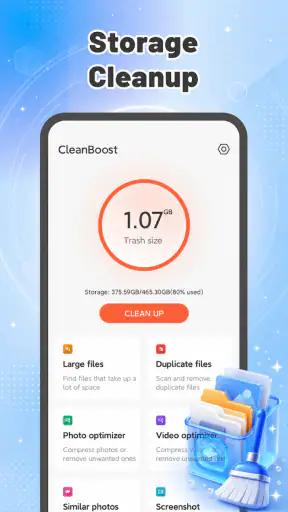


I found CleanBoost most useful as a quick storage-maintenance tool rather than a complete solution to every phone-performance problem. Its purpose is straightforward: help identify junk files and free space without turning storage cleanup into a complicated project. That simplicity is its main appeal, especially for someone who wants a lightweight tool and does not want to sort through folders manually.
My overall impression is positive but measured. CleanBoost is free, aimed at everyone, and developed by Fadilo Studio. It has reached over five million installs and holds a 3.7 average from around eleven thousand ratings, which suggests that plenty of people find the basic idea useful while the experience may not satisfy every type of user. I would recommend trying it when your phone is repeatedly warning about low storage, but I would not treat it as a magic speed booster or a replacement for careful file management.
What CleanBoost does well in everyday storage maintenance
The strongest part of the app is its clear focus. Instead of presenting itself as a huge toolbox, it concentrates on cleaning unnecessary files and reclaiming device storage. That makes the first use less intimidating. If you are helping a family member who keeps running out of space, or if you simply want a more approachable way to inspect clutter, this narrow purpose works in its favor.
In my experience, the value of a cleaner is not just the amount of space it can recover. It is also the time it saves. Looking through download folders, temporary files, old installation packages and forgotten media can be tedious. A dedicated cleaning app gives that task a defined starting point. I can open it when storage becomes a problem, review what it identifies, and decide whether the suggested cleanup is worthwhile.
That last step matters. I would not approve every cleanup blindly. A file that appears disposable may still be useful to me, particularly if it is a downloaded document, an image saved for later, or content from an app I do not open often. CleanBoost is best used as an assistant that brings possible clutter to my attention, not as an automatic substitute for judgment.
A practical routine is to run a scan before a long trip, before downloading a large offline playlist, or before installing a demanding game. Those moments make storage problems especially frustrating because the phone may fail at the exact time I need it. Cleaning in advance is more sensible than waiting until an installation is blocked.
Another useful habit is to treat the app as a periodic maintenance check rather than something that must remain open constantly. If I use a cleaner every few days without checking the results, I risk deleting things simply because the app labels them as unnecessary. A less frequent, deliberate review gives me more control and makes the process safer.
A simple workflow that avoids accidental deletion
I would begin by checking the phone’s own storage screen, then open CleanBoost to look for the categories it highlights. This gives me a reference point and helps me notice whether the proposed cleanup is actually relevant. If the device’s built-in tools already show that videos or offline downloads are the main problem, a cleaner may not add much until those large files are handled.
After a scan, I would review the results in groups rather than selecting everything immediately. Temporary clutter is generally easier to understand than personal files. I would be especially cautious with anything connected to messaging, work documents, travel details or photos that have not been backed up elsewhere. This extra pause is the difference between convenient maintenance and an unpleasant recovery task.
Once I have removed clearly unwanted material, I would check storage again and open the apps that matter most. This helps separate a real improvement from a merely reassuring number. If an app behaves normally and the phone has enough free space for its usual tasks, there may be no reason to continue cleaning.
The most important strength is the balance between a lightweight purpose and a manageable workflow. CleanBoost does not need to replace every storage tool on the phone to be useful. It only needs to make routine cleanup easier, and that is where its concept makes sense.
Where it fits beside built-in phone tools
Android already includes storage-management features, and those tools should be the first comparison point. The system settings usually provide direct information about which apps, photos, videos or downloads occupy space. They also have the advantage of being integrated into the operating system. If I need to uninstall a large app or remove a specific video, the built-in option may be faster and more transparent than opening another utility.
CleanBoost becomes more appealing when I want a dedicated cleanup session with less wandering through settings. Its role is convenience and focus. It can serve users who find storage menus confusing or who prefer one place to begin looking for removable clutter. However, anyone who wants detailed control over individual folders may be better served by a full file manager.
Cloud photo services are another alternative, but they solve a different problem. They can help move personal images away from local storage, while CleanBoost is oriented toward finding junk and reclaiming space on the device. A cloud backup is not a reason to delete files without checking synchronization, and a cleaner is not a backup system. I would keep those jobs separate.
Dedicated file managers are stronger when the problem is organization rather than junk. They let me rename, move, archive and inspect files with more precision. CleanBoost is the better fit for a quick first pass; a file manager is better when I already know exactly what I want to keep or remove.
The limitations that should shape your expectations
The main weakness is that a cleaner cannot fix every reason a phone feels slow. Low storage can contribute to an unpleasant experience, but performance can also depend on aging hardware, background activity, software updates, app design and battery condition. If a phone remains sluggish after removing clutter, I would look at those factors instead of repeatedly running the cleaner.
There is also a trade-off between simplicity and control. A focused interface can make cleanup approachable, but it may not satisfy someone who wants a detailed explanation for every file. Before deleting anything important, I want to understand what it is, where it came from and whether an app may recreate it. Users who prefer complete technical visibility should rely more heavily on system storage screens and a capable file manager.
Another point of friction is the need to review recommendations carefully. “Junk” is a useful everyday label, but personal storage is rarely as clear-cut as a label suggests. A forgotten download may be junk to one person and an essential document to another. I would never use a cleaner while rushed, distracted or trying to free space immediately before an important activity.
CleanBoost is also not the right choice for someone expecting a security product, a backup service or a full device optimizer. Those are separate categories with different responsibilities. Removing unnecessary files can improve available space, but it does not automatically protect accounts, recover lost photos or repair an operating-system issue.
The app’s current version is 1.0.3 and it supports devices running Android 8.0 or later. That makes it accessible to many Android users, including people with older phones, but compatibility alone does not guarantee that every device will benefit equally. The amount of useful cleanup depends on how each person uses their phone and how much removable clutter has accumulated.
Who will get the most from it
I see CleanBoost working best for people who repeatedly receive low-storage warnings but do not want to become experts in Android file management. It is also a reasonable choice for users with modest storage who install and remove many apps, download media for temporary use, or accumulate leftovers without noticing.
It can be helpful on a shared family device too. A parent or relative may not know which folders are safe to inspect, while a focused cleaner provides a more approachable starting point. I would still supervise the first cleanup if the phone contains important work, medical, financial or family files.
People who frequently prepare their phones for travel may appreciate the routine. Before a flight or a long journey, I might remove obvious clutter, confirm that essential offline content remains available, and create enough room for new maps, photos or entertainment. The useful insight here is that cleanup is most valuable when tied to a specific storage need, not when performed as a vague attempt to make the phone “better.”
It is less suitable for advanced users who already understand their storage layout. If I know that a large video folder is responsible for the problem, opening the gallery or file manager is likely more direct. Likewise, users with ample free space and no storage symptoms may gain little from adding another maintenance step.
Questions I would ask before installing
Will it free space immediately? It may help when removable junk is the reason storage is crowded, but the result depends on what is actually on the phone. Large personal videos, offline media and unused apps often require direct decisions rather than a simple junk cleanup.
Is it safe to approve everything it finds? I would not. I would review the categories and keep anything whose purpose is unclear. A fast cleanup is not worth losing a document or a file that has not been backed up.
Does it replace Android’s own storage controls? No. I would use the system settings for a broad view of storage and uninstalling apps, then use CleanBoost when I want a more focused cleanup pass. The two approaches can complement each other.
Can it make an old phone feel new? I would keep expectations realistic. Recovering space can make everyday management easier, particularly when storage is nearly full, but it cannot change the phone’s processor, battery health or hardware age.
Is the free price a good reason to try it? Yes, if the problem is specifically storage clutter and I am comfortable reviewing cleanup suggestions. Because it is free and rated for everyone, the barrier to testing the basic idea is low. The more important question is whether its focused workflow is more convenient for me than the tools already built into my phone.
My verdict for CleanBoost
CleanBoost succeeds when I treat it as a practical housekeeping tool. Its clear purpose, lightweight positioning and accessible Android support make it easy to recommend to people who want help finding removable clutter without navigating a complicated utility suite. The developer, Fadilo Studio, has chosen a straightforward direction, and the app’s popularity shows that this kind of focused tool meets a common need.
At the same time, I would not install it with the expectation that it will solve every performance complaint. The app is most convincing when storage is genuinely tight and I need a guided place to begin. It is less compelling when I already know what occupies my phone or when I need backups, security controls and detailed file operations.
My recommendation is simple: try it for a careful, occasional cleanup, compare its suggestions with Android’s own storage view, and keep personal files under your control. For a user who wants a free way to make storage maintenance less intimidating, CleanBoost is worth considering. For an advanced user seeking deep file management or a complete phone-optimization suite, a system tool or full file manager will probably be the better choice.
In short, CleanBoost - Junk Cleaner earns its place through convenience rather than complexity. Used thoughtfully, it can turn an irritating low-storage problem into a manageable routine. Used carelessly, it can encourage the false idea that every highlighted file should disappear. That distinction defines my final opinion: useful, approachable and worth trying, provided you remain the person making the final deletion decisions.


